
Free Text to Handwriting Converter: Turn Typed Text into Real Handwritten Notes
If you're a student, you know the drill. You spend an hour typing out an assignment on your laptop. Then the teacher says it has to be submitted "in your own handwriting." Now you're copying every word by hand, your wrist hurts by page three, and by the last page it barely looks like your writing anymore.
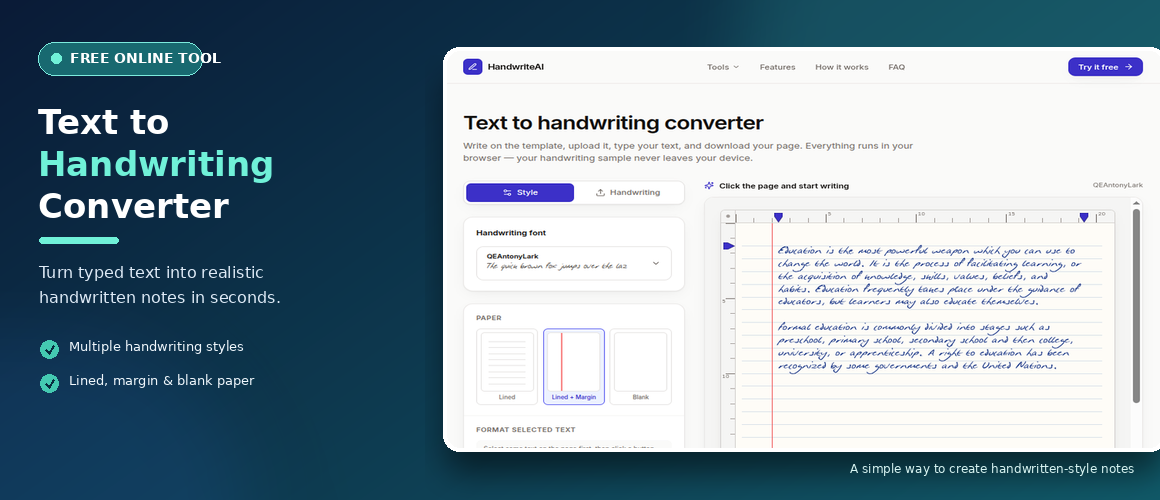
It's frustrating. And it's exactly why we built a simple tool that solves it — an online free text to handwriting assignment converter that takes your typed text and turns it into a realistic handwritten page you can download as a PDF.
No apps to install. No accounts to create. Just paste, preview, download.
Why Would Anyone Need This?
The obvious answer is assignments. But that's only one use case.
Teachers use it to prepare handwritten notes for their classes — worksheets, practice problems, study material — without sitting and writing everything by hand. Writers use it to create handwritten quotes for posters and social media. Small business owners use it for handwritten thank-you notes to customers. Designers use it to add a personal touch to cards, mockups, and film props.
And then there's the practical side: some people have hand injuries, tremors, or simply terrible handwriting. They want their work to look clean and readable. They want it to feel human. This tool makes that possible without asking them to fight their own hand.
How the Tool Works
There are no complicated steps. Here's the entire process:
Step 1: Open the tool on your browser. You don't need to sign up or install anything.
Step 2: Paste your text into the editor. It can be a full essay, a short note, or a paragraph — there's no length limit you need to worry about.
Step 3: Pick your paper style. You can choose blank, lined, or lined with a left margin, just like a real notebook. You can also adjust margins with simple ruler handles if you want more writing space.
Step 4: Choose your handwriting style. You can either use one of the built-in fonts or upload a sample of your own handwriting. If you upload your own, the tool learns your style and writes new text in it.
Step 5: Preview your page. It updates live as you type, so you can adjust font size, line spacing, and ink color until it looks right.
Step 6: Download it. You can export your handwritten page as a PDF, a Word document, or a PNG image.
That's it. What used to take two hours of hand-writing now takes about two minutes.
What Makes This One Different
Plenty of sites offer text-to-handwriting conversions. Most of them use the same six or seven pre-made fonts, so every output looks identical. Your "handwriting" ends up looking exactly like thousands of other users' handwriting. That defeats the whole purpose.
Our tool does two things differently:
First, you can upload your own handwriting. Write a sample on a template, take a photo, and the tool extracts your actual letter shapes. Everything you generate after that looks like you wrote it. Not a stranger. Not a generic script font. You.
Second, we apply natural variation to every character. Real handwriting isn't perfectly uniform — letters drift slightly, tilt, and space out differently. Our renderer adds those small imperfections so the output doesn't look like a font sitting flat on a page. It looks like someone actually wrote it with a pen.
Using It as a Text to Handwritten Notes PDF Generator
One of the most common requests we get is for a text to handwritten notes PDF generator. Students want to convert their study notes into something they can print and carry. Teachers want PDF versions of worksheets they can email out.
The PDF export handles this cleanly. Your handwritten page downloads at print-ready resolution. Print it at 100% scale and it looks like a real A4 sheet of paper. Multi-page documents paginate automatically, so a 5,000-word essay becomes multiple clean pages without any manual work.
You can also export as Word if you need to edit later, or as an image if you're posting somewhere online.
A Few Honest Tips for Better Results
If you're using one of the built-in handwriting styles, the output will look good right away. If you're uploading your own handwriting, quality depends on your sample photo. Here's what helps:
Write your sample on plain white paper with a dark pen. No pencil, no light blue ink.
Photograph it flat, straight-on, in bright even light. Avoid shadows, angle, or glare.
If your handwriting is cursive or connected, expect a bit of a wait — the tool works best with print-style writing.
For long documents, preview the first page before downloading. If the size or spacing looks off, adjust and try again. It's faster than re-doing the whole thing later.
Who This Is Really For
The tool is for anyone who needs to produce handwritten-looking content without actually handwriting it. That includes:
Students who want to submit typed work in a handwritten format when handwriting is required.
Teachers preparing notes and worksheets faster.
Professionals sending handwritten thank-you notes or personalized messages.
Designers and content creators building mockups, props, or artwork.
Anyone with hand pain or motor difficulties who wants clean handwriting without the physical strain.
A Note on Responsible Use
We want to be straight with you here. This tool exists to help people, not to mislead them. Using it to submit work you didn't write is not okay. Using it to create a fake signature is not okay. Using it to make notes look handwritten when they aren't yours — that's on you to decide where the line is, based on your school or workplace rules.
What it is for: saving time, making things look nicer, and helping people who physically can't write by hand produce work that still feels personal.
Try It Free
The online free text to handwriting assignment converter is available right now on our site. No sign-up, no payment, no watermark on the output. Paste your text, pick a style, download the PDF. It takes less time than reading this post.
Try it here: https://leavetrackr.com/tools/text-to-handwriting
If you need something specific — cursive support, different paper sizes, more languages — let us know. We're building this in the open and improving it based on what people actually need.